Lexical Specification
Before a parser can apply grammar productions, the lexer (also called the tokenizer or scanner) turns the raw input into a stream of tokens. The lexical specification is the part of a grammar that declares those tokens. This chapter covers how tokens are declared, the regular-expression syntax used to match them, lexical states, and the options that influence tokenization.
Token productions
A token production declares one or more token types. It has the form:
[ <states> ] KIND [ [IGNORE_CASE] ] [ #ClassName ] :
    spec
  | spec
  ...
;
where KIND is one of the following keywords:
TOKENProduces a token that is passed to the parser. (
REGULAR_TOKENis an accepted synonym.)SKIPMatches and discards the input — no token reaches the parser. Use it for whitespace and anything else the grammar should ignore.
UNPARSEDProduces a token that is not passed to the parser but is retained and attached to the next regular token. This is how comments are usually handled, so they can be recovered later without cluttering the grammar.
SPECIAL_TOKENis an accepted synonym.MOREMatches input that is held over and prepended to whatever token is matched next. It is used to build a token up out of several lexical pieces.
CONTEXTUALDeclares a token that the lexer only produces where the parser actually allows it. Contextual tokens are covered in Advanced Tokenization; their pattern must be a plain string literal.
The simplest possible token production lists one or more string literals or
named patterns, separated by | and terminated with a semicolon:
SKIP : " " | "\t" | "\r" | "\n" ;

TOKEN :
    <NUMBER : (["0"-"9"])+ >
  | <COMMA : "," >
;
Note
Braces { } are reserved for embedded target-language code. A token
production that has no embedded action therefore contains no braces; it
ends with a semicolon.
Regular-expression syntax
The pattern on the right of a token declaration is a regular expression built from the following elements.
- String and character literals
"while"matches that exact text. Single-character literals may be written with single quotes —'x'— and a single-quoted string of two or more characters ('abc') is also accepted. Standard escapes apply, including\n,\t,\\,\"and Unicode escapes such as\u0041.- Named tokens
<NAME : pattern>gives a token type the nameNAME. The name is what you refer to elsewhere in the grammar, and it becomes a value of the generatedTokenTypeenumeration.- References
Inside a pattern,
<NAME>stands for the pattern of the token (or private regular expression) namedNAME.- Character classes
["a"-"z", "A"-"Z", "_"]matches any one character in the listed set or ranges. Prefix the class with~to negate it:~["\n"]matches any character except a newline.- Grouping, alternation, and repetition
Parentheses group;
|separates alternatives; and a parenthesized group may be followed by a repetition operator:Operator
Meaning
( … )*zero or more
( … )+one or more
( … )?zero or one (optional)
( … ){n}exactly n times
( … ){n,}n or more times
( … ){n,m}between n and m times
Putting these together, a typical identifier and a four-hex-digit escape look like this:
TOKEN :
    <IDENTIFIER : ["a"-"z","A"-"Z","_"] (["a"-"z","A"-"Z","0"-"9","_"])* >
  | <#HEX : ["0"-"9","a"-"f","A"-"F"]   >   // private; see below
  | <UNICODE_ESCAPE : "\\u" (<HEX>){4} >
;
Tip
A bare string literal is a complete token specification on its own
(SKIP : "\t" ;). Anything more than a string literal — a character
class, a reference, or any larger expression — must be enclosed in angle
brackets (SKIP : <~["\n"]> ;). Forgetting the angle brackets is a common
first mistake.
- Private regular expressions
A pattern declared with a
#before its name —<#HEX : …>above — is private: it is a named building block you can reference from other patterns, but it never becomes a token type of its own. Private regular expressions keep complex patterns readable.
Matching the end of input
The built-in token <EOF> matches the end of the input. Anchoring a start
production with <EOF> forces the parser to consume the entire input rather
than stopping after a valid prefix:
NumberList : <NUMBER> ( <COMMA> <NUMBER> )* <EOF> ;
Case-insensitive matching
Place [IGNORE_CASE] immediately after the kind keyword to make every
pattern in that production match without regard to case:
TOKEN [IGNORE_CASE] : <BEGIN : "begin"> | <END : "end"> ;
To make the entire grammar case-insensitive, set the IGNORE_CASE setting
at the top of the file instead (see Settings Reference).
Token node classes
By default each token type is also a node in the syntax tree (see
Tree Building). Two # annotations let you control the class of
those nodes:
KIND #ClassName : …puts every token in the production into a shared node class. For example,TOKEN #Keyword : <BEGIN: "begin"> | <END: "end"> ;makes bothBEGINandENDinstances of a generatedKeywordclass, which is convenient when you want to treat a family of tokens uniformly.A
#Nameafter an individual pattern gives that one token a node class (and, when combined with a production-level class, makes it a subclass).
Lazy tokens
A token declared with a ? before its name — <?NAME : …> — is lazy:
it prefers the shortest match rather than the longest. Lazy tokens are useful
for constructs such as block comments; they are described in detail in
Advanced Tokenization.
Lexical states
The lexer is a state machine. Every token production belongs to one or more lexical states, and at any moment the lexer is in exactly one state and can only match the tokens defined for it. This is how the same characters can be tokenized differently in different contexts.
The starting state is named DEFAULT unless you change it with the
DEFAULT_LEXICAL_STATE setting. A token production with no state prefix
belongs to the current default state.
- Specifying states
A state prefix before the kind keyword lists the states a production belongs to:
<COMMENT> SKIP : <~["\n"]> ;          // only in the COMMENT state
<DEFAULT, COMMENT> TOKEN : … ;         // in both states
<*> SKIP : "\f" ;                      // in every state
- Switching states
A trailing
: NEXT_STATEafter a token tells the lexer which state to enter after matching that token:SKIP : "#" : COMMENT ; // on '#', switch to COMMENT <COMMENT> SKIP : <~["\n"]> ; // consume the comment body <COMMENT> SKIP : "\n" : DEFAULT ; // newline ends the comment
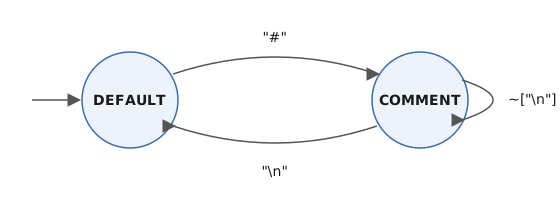
The three SKIP rules above, viewed as a lexical-state machine.
The three rules above implement line comments without involving the parser at all. Combined with a couple of keyword and identifier tokens —
PARSER_PACKAGE = "lex.test";

SKIP : " " | "\t" | "\n" | "\r" ;

TOKEN : <#LETTER : ["a"-"z", "A"-"Z"] > ;
TOKEN [IGNORE_CASE] #Keyword : <BEGIN : "begin"> | <END : "end"> ;
TOKEN : <IDENTIFIER : <LETTER> (<LETTER> | ["0"-"9"])* > ;

SKIP : "#" : COMMENT ;
<COMMENT> SKIP : <~["\n"]> ;
<COMMENT> SKIP : "\n" : DEFAULT ;

Root : ( <BEGIN> | <END> | <IDENTIFIER> )* <EOF> ;
— parsing the input BEGIN foo123 # a comment\n end produces this tree:
<Root (1, 1)-(2, 4)>
  Keyword: (1, 1) - (1, 5): BEGIN
  IDENTIFIER: (1, 7) - (1, 12): foo123
  Keyword: (2, 2) - (2, 4): end
  Token: (2, 1) - (2, 1): EOF
Note that BEGIN (upper case) and end (lower case) both matched the
case-insensitive keywords and appear as Keyword nodes, while the comment
was skipped entirely by the COMMENT state.
For switching states from within the parser (rather than the lexer), and for turning individual tokens on and off as parsing proceeds, see Advanced Tokenization.
Unicode
CongoCC operates on the full 32-bit Unicode range. Character classes and
literals may contain any code point, including those above the Basic
Multilingual Plane, and \u escapes are supported. Input is assumed to be
UTF-8.
Implicit tokens
You do not have to declare every token in a TOKEN production. A string
literal written directly in a grammar production — for instance "(" in
( "(" Expression ")" ) — implicitly defines a token for that literal. This
keeps grammars concise, but it can also hide typos, since a misspelled literal
silently becomes a new token type.
Setting REQUIRE_TOKEN_DECLARATION = true; turns that convenience off: every
token must then be declared in a token production, and an undeclared string
literal is reported as an error. See Settings Reference and
Productions and Expansions for how string literals are used inside expansions.